
蘋果已經在 iOS 26.1 開放 Apple Intelligence 繁體中文版語系,不過有不少 iPhone 用戶卻發現,一直會出現 Apple Intelligence 無法下載造成卡住,導致書寫功能、Genmoji和影像樂園無法用,要是也有遇到Apple Intelligence下載卡住問題,可以利用這篇方法來解決。
Apple Intelligence下載卡住或無法使用主要原因
蘋果在 WWDC2024 發表的 Apple Intelligence,被視為 Apple 跨入生成式 AI 時代的核心布局。這套蘋果 AI 系統整合了智慧型建議、全新寫作工具、智慧照片分類、與 ChatGPT 的深度串接,以及 CleanUp AI 一鍵消除物件功能,也算是讓 iPhone、iPad 和 Mac 等設備開啟全新 AI 智慧功能。
不少 iPhone 用戶卻發現 Apple Intelligence 無法啟用或下載卡住,據了解主要原因最常見:
- 裝置不相容造成
- iOS 系統問題
- 地區限制
- 仍在等待名單中
- 沒使用Wi-Fi環境
- 功能設定錯誤

如何解決Apple Intelligence無法用或下載卡住?
要是遇到Apple Intelligence出問題造成無法使用,建議依照底下步驟檢查來排除各種錯誤:
第1步:確認裝置相容性
Apple Intelligence 並非適用於所有 iPhone 、iPad 和 Mac 裝置,需要特定的高效能晶片才能在裝置上處理複雜的 AI 模型。如果設備不相容 Apple Intelligence,那就代表你無法使用此功能。
支援 Apple Intelligence 的裝置清單:
| 設備 | 型號 |
|---|---|
| iPhone | iPhone 15 Pro系列 iPhone 16系列 iPhone 16 Pro系列 iPhone 17 iPhone 17 Pro系列 iPhone Air |
| iPad | 搭載 M1 或更新晶片的iPad Air 、iPad Pro機型 |
| Mac | 搭載 M1 或更新晶片 MacBook Air、MacBook Pro、iMac、Mac mini、Mac Studio、Mac Pro |
第2步:檢查 iOS 版本與設定
要啟動 Apple Intelligence 中文版,需要升級到 iOS 26.1 或新版本才能支援,舊版本系統和 iOS 18 都無法使用。
如想了解 Apple Intelligence 功能使用方式,可參考「Apple Intelligence 怎麼用?支援機型、功能亮點與下載方式一次看」。
第3步:排除地區與語言問題
要是升級到 iOS 26.1 或新版本後,還是發現 Apple Intelligence 無法使用,就要確認 iPhone 裝置地區和 Siri 語系是否調整為台灣(繁體中文),才能解決此問題。
變更 iPhone 語言地區:
- 前往「設定」>「一般」>「語言與區域」。
- 在「區域」選項中,選擇「台灣」。

變更 Siri 語言:
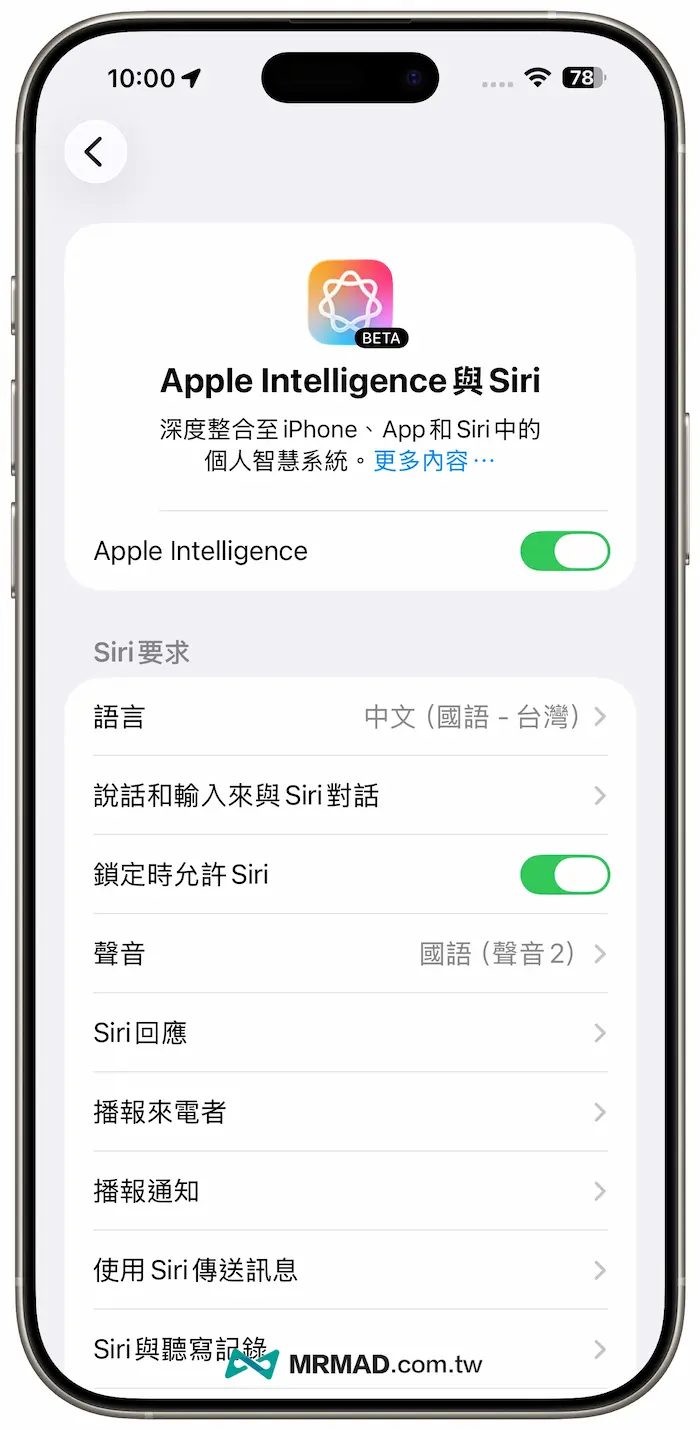
- 前往「設定」>「Apple Intelligence與Siri」。
- 在「語言」中,選擇「中文(國語-台灣)」。

在完成以上設定後,重新啟動您的 iPhone,然後再次檢查 Apple Intelligence 功能是否出現。
第4步:關閉行動網絡並連接Wi-Fi
要是已經有出現 Apple Intelligence 功能選項,但是會卡在 Apple Intelligence 無法下載狀態下,可以嘗試關閉 iPhone 行動網路,找 Wi-Fi 環境來下載 Apple Intelligence 模組。

第5步:開關飛航模式
要是沒在使用Wi-Fi網路,目前是以iPhone連接行動網路狀態下,也可以嘗試打開「飛航模式」再關閉,通常就可以解決 Apple Intelligence 卡無法下載問題。

第6步:重新更改地區
有時 Apple Intelligence 卡無法下載錯誤,也可能是因 iOS 系統造成的錯誤,也可以嘗試重新修改一次 iPhone 系統地區,先改成其他語系後,再次改回繁體中文。

第7步:重置iPhone所有設定
這個方法不會刪除您的個人資料,但會將所有系統設定(如 Wi-Fi 密碼、藍牙配對等)恢復到出廠狀態。
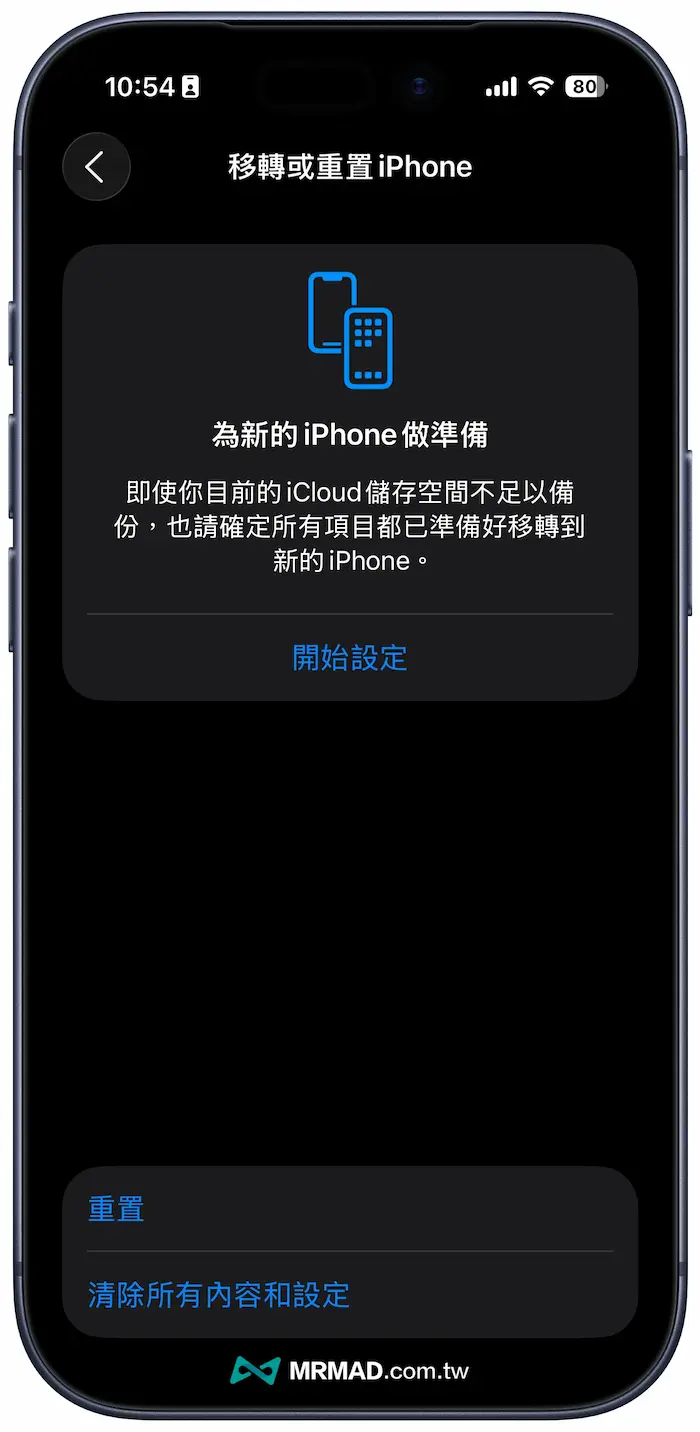
iPhone 重置所有功能可透過「設定」>「一般」>「移轉或重置 iPhone」>「重置」>「重置所有設定」,輸入您的密碼,並確認重置。
第8步:等待排隊等待下載
要是在重置 iPhone 所以設定後,還是卡在 Apple Intelligence 無法下載,主要是因為蘋果是以分批排隊下載,有網友分享要先將 iPhone 鎖定時間改成永不,並且連上 Wi-Fi 網路等待排隊下載完成。
第9步:等待 iOS 更新
就目前 Apple Intelligence 繁體中文語系才剛推出不久,且 iOS 26.1 也正處於測試版環境,目前有網友發現部分 iPhone 機型確實會出現 Apple Intelligence 下載卡住情況,就需要等待後續蘋果釋出 iOS 26 修正或等待正式版才能解決。
就連同 iPhone 17 系列在下載 Apple Intelligence 時,同樣被發現在下載Genmoji、影像樂園等功能會卡住情況,當前蘋果支援技術人員也已經確認這項問題,並準備在後續 iOS 26 釋出更新修復錯誤。
Apple Intelligence錯誤常見問題
為什麼 Apple Intelligence 只支援 iPhone 15 Pro 系列?
Apple Intelligence 需要高規格的晶片來處理複雜的裝置內 AI 運算。目前只有搭載 A17 Pro 晶片的 iPhone 15 Pro 系列,或搭載 M1/M2 晶片的裝置,具備足夠的運算能力。
我在Apple Intelligence等待名單上,需要做什麼?
如果在啟用時看到Apple Intelligence等待名單的訊息,這表示 Apple 正在分批向用戶推送該功能。您不需要做任何事情,只需要等待 Apple 通知您服務已啟用。
Apple Intelligence繁體中文為什麼只限制iOS 26.1版本?
主要是新功能都需要隨iOS 26版本更新才能支援,就像是最初Apple Intelligence英文版只限制iOS 18是同樣道理。